Set up Slack alarms in Datadog
To receive alerts in Slack, Datadog must be integrated with the desired Slack channels.
This is currently configured using Terraform.
To add a new Slack channel integration:
- Add the Slack channel name to the
localsblock. - Create a Pull Request.
- Terraform
planandapplywill run automatically.
This has already been configured for all existing public Slack channels following the <product>-alert naming convention.
Creating a new alarm in Datadog
-
In Datadog, go to the left menu and select
Monitors → New Monitor -
Select the desired monitor type
(e.g. logs, metrics, traces). -
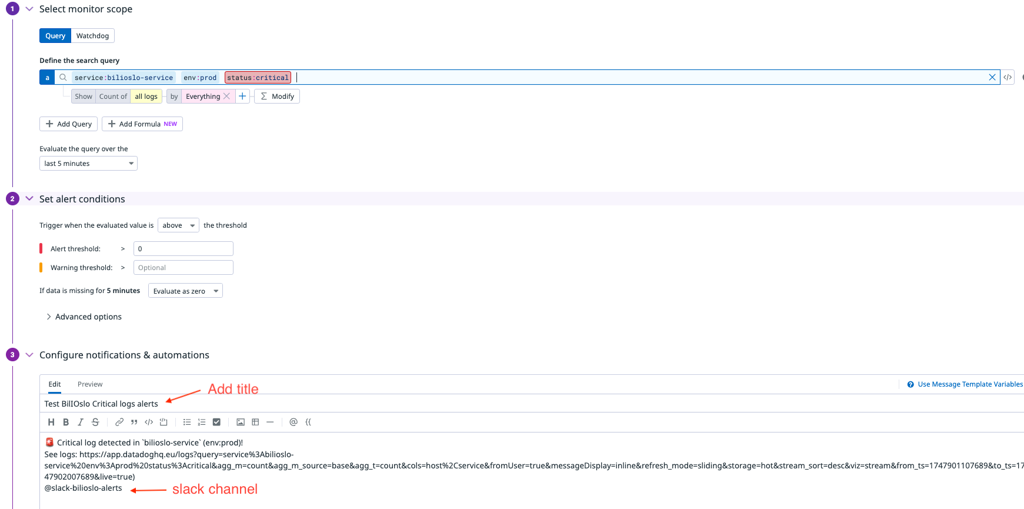
Configure the monitor.
The configuration form varies depending on the monitor type, but typically includes:
-
Scope
Select which services, environments, or tags you want to monitor. -
Conditions
Define thresholds, time windows, and alert severity. -
Message
Define the message that should be sent when the alert triggers.
To send an alert to a Slack channel, mention the channel in the Message field using the @ symbol.
Example: @slack-channel-name